Showing posts with label JavaScript Tutorials. Show all posts

Wednesday, 21 March 2018

Learn: How to use confirm box in JavaScript


The confirm box used to display a message and return a true or false value. Now create a web page named confirmBoxUse.html which shows the use of the confirm box.

###### Showing the code for the confirmBoxUse.html file #####
<!DOCTYPE html>
<html>
<head>
<title>Using The confirm box</title>
</head>
<body>
<SCRIPT type=”text/javascript”>
var qry=(“Are you sure to send this file to  Recycle Bin ?”);
if(qry)
document.write(“Welcome to JavaScript.<br/> You have moved the file to Recycle Bin.”);
else
document.write(“Welcome to JavaScript<br/> The file is not Moved”);
</SCRIPT>
</body>
</html>
We can observe that the var variable stores the value of the query based on whether we click the ok or the Cancel button.

######Shows the output of the confirmBoxUse.html file ######


When you click the ok button a message appears on the Web page.


How to use the alert box in JavaScript


The alert box is generally used to display an alert message while executing JavaScript code. Now here We create a Web page named alertBoxUse.html which shows the use of alert box.

##### Showing the code for the alertBosUse.html file #####
<!DOCTYPE html>
<html>
<head>
<title>using the alert box</title>
</head>
<body bgcolor=”#FFSSTT” text=”green”>
<h1>Showing the alert box</h1>
<SCRIPT type=”text/javascript”>
alert(“Hello, I m an alert box.”);
</SCRIPT>
</body>
</html>


We have used an alert box to display a message stating Hello, I am an alert box when the alertBoxUse.html page loads.


How to use continue Statement in JavaScript


The continue statement can also be used to stop the execution of a loop. It does not exit the loop rather it executes the condition for the next iteration of the loop. Now here we create a web page named ContinueStatementUse.html which shows the use of continue statement.
####Showing the Code for ContinueStatementUse.html file#####
<!DOCTYPE html>
<html>
<head>
<title>Using continue Statement In javaScript</title>
</head>
<body background=”wall.jpg” text=”#ff98ff”>
<h1>How to work continue  Statement in the while loop</h1>
<SCRIPT type=”text/javascript”>
var count=0;
while(count<10)
{
++count;
If((count%2==0))
continue;
else
document.write(“count=”+count+”<br/>”);
}
document.write(“While loop exited”);
</SCRIPT>
</body>
</html>

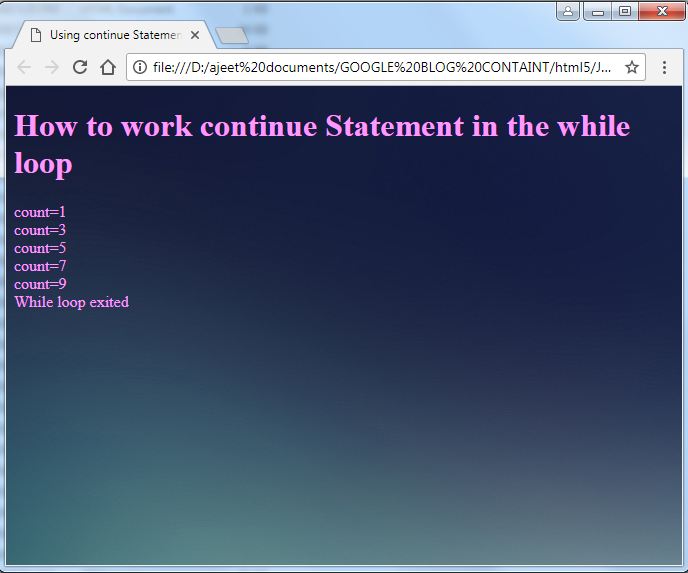
Here the if……else statement inside the while loop contains a continue statement. The condition of the if …else statement checks whether or not the count variable is divisible by 2. If the count variable is divisible by 2 then the continue statement is executed. As a result execution of the loop is halted the remaining statements are skipped and the condition of the while loop is evaluated for the next iteration. Note that in this case the continue statement is executed for every even number between 0 and 10.

##### Showing the Output of ContinueStatementUse.html ######


How to use break statement in JavaScript


The break statement allows us to break or exit a loop. Now here we create a Web page named BreakStatementUse.html which shows the use of break statement

##### Showing the Code for the BreakStatementUse.html file #######
<!DOCTYPE html>
<html>
<head>
<title>Using break Statement In javaScript</title>
</head>
<body background=”wall.jpg” text=”#ff98OO”>
<h1>Using break Statement in the while loop</h1>
<SCRIPT type=”text/javascript”>
var count=0;
while(count<10)
{
++count;
If((count%5==0))
break;
else
document.write(“count=”+count+”<br/>”);
}
document.write(“While loop exited”);
</SCRIPT>
</body>
</html>
Here if the value of the  count variable is less than 10 the while loop is executed. The if…else statement specified inside the while loop checks whether the value of the count variable is divisible by 2 or not. If the value of count variable is divisible by 2 then the break statement is executed. As a result the while loop is exited and the statement immediately following the while loop is executed.


#### Showing the output of the BreakStatementUse.html File. ######


Friday, 9 March 2018

Learn : Shows the use of "for Loop" in JavaScript

We can execute a group of statements multiple times based on a specific condition by using the for loop. Now create a Web page named ForLoopUse.html which shows the use of for loop.


####Showing the for Code for the ForLoopUse.html file #######

<!DOCTYPE html>
<html>
<head>
<title>Using the for loop</title>
</head>
<body>
<h1>Using the for loop in the Script</h1>
<SCRIPT type="text/javascript">
var number;
document.write("Even Numbers From 0 to 10 <br/>");
for(number=0;number<=10;number=number+2)
{
document.write(number+"<br/>");
}
</SCRIPT>
</body>
</html>

Here: The number variable is declared to store an even number from 0 to 10. In the for loop the number variable is used as loop control variable and is assigned a value of 0. The condition number<=10 is then evaluated. This condition is true in the first iteration as a result the value of the number variable is displayed. After this the number variable is incremented by 2 and the condition is evaluated again. In this way the for loop iterates six times until the value of the number variable becomes.

######Showing the output of the ForloopUse.html######


We can observe that the for loop is executed until the number variable is less than or equal to 10.


Wednesday, 7 March 2018

How to use of do...while loop in JavaScript

If we want a group of statement to be executed at last once then we can use the do....while loop. This is possible because the condition of the do...while loop is placed at the end of the loop.
Now here we create a web page named dowhileloopuse.html which shows the use of the do...while loop.

####Showing the code for the dowhileloopuse.html file######

<!DOCTYPE html>
<html>
<head>
<title>The Use of do..while Loop</title>
</head>
<body background="images.jpg" text="#ff34AS">
<h1>The Use of The do..while loop in the JavaScript</h1>
<SCRIPT type="text/javascript">
var t_Distance=0,fare=0;
do{
document.write("Rs."+fare+"for"+t_Distance+"KM distance<br/>");
document.write("<hr/>");
fare=fare+5;
t_Distance=t_Distance+2;
}
while(t_Distance<=10);
</SCRIPT>
</body>
</html>

After assigning values to the t_Distance and fare variables the group of statement inside the do..while loop is executed. After executing the group of statement the condition is evaluated. Note that in the first iteration the condition is true because the t_Distance variable has the value 2. The do..while loop executes repeatedly until the condition of the loop is false that is the value of the t_Distance variable becomes more than or equal to 10.


Sunday, 4 March 2018

Learn How to use while loop in JavaScript

We can use the while loop when we want to check the condition at the start of the loop. The group of statements that is to be executed is specified after the condition. Now here create a Web page named WhileLoopUse.html which shows the use of use of while loop.

#####Showing the code WhileLoopUse.html file#####

<!DOCTYPE html>
<html>
<head>
<title>Using While Loop</title>
</head>
<body background="img.jpeg" text="Green">
<h1>using while loop in the script</h1>
<SCRIPT type="text/javascript">
var totalDistance=0, fare=0;
while(totalDistance<=10)
{
fare=fare+5;
totalDistance=totalDistance+2;
document.write("Rs."+fare+"for"+totalDistance+"KM distance.<br/>");
}
document.write("Thanku Very Much!!!!!!!!!!");
</SCRIPT>
</body>
</html>


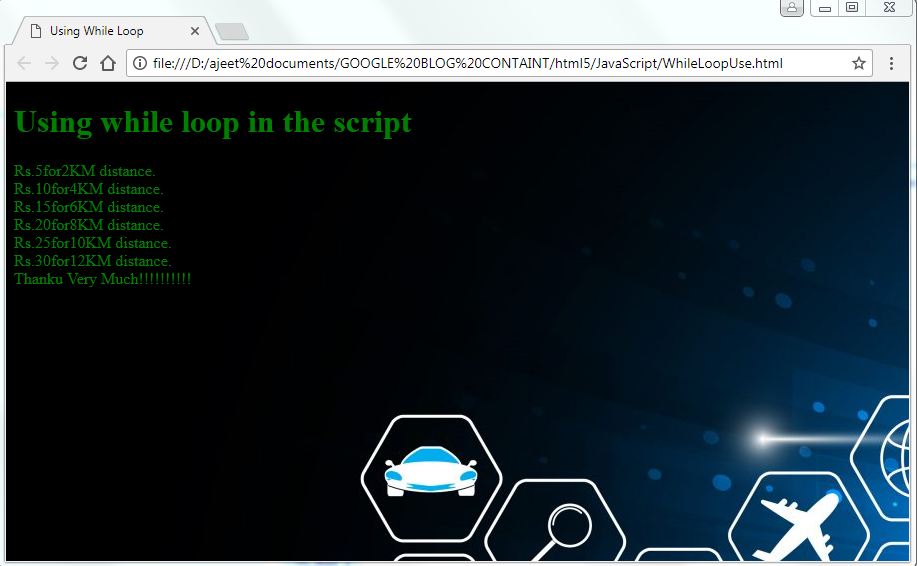
Here the while loop has a condition totalDistance<=10, which checks whether or not the value of the totalDistance variable is less than or equal to 10. In the first iteration the condition is true as totalDistance is 0. As a result the group of statements specified inside the while loop is executed that is the fare variable is incremented by 5 and the value of totalDistance is incremented by 2. The condition of the while loop is evaluated again in the second iteration which is also true and as a result the values of fare and totalDistance are increment again. Note that in this way the while loop execute six times. At the end of the sixth iteration the totalDistance variable is equal to 12 and when the condition is evaluated in the seventh iteration it become false. As a result the while loop is exited and Thanku Very Much!!!! message is displayed.


Friday, 2 March 2018

How to use of the switch statement in JavaScript

We can use the switch statement to select a particular group of statement to be executed among several other groups of statements. Now here We create a Web Page named SwitchStatemet.html which shows the use of the switch statement.

####Showing the code for the SwitchStatement.html #####

<!DOCTYPE html>
<head>
<title>Using Switch Statement </title>
</head>
<body background="img.jpeg" text="green">
<h1>Using switch Statement in the script </h1>
<SCRIPT type="text/javascript">
var letter="I"
switch(letter)
{

case "A":document.write("A is a vowel");
break;
case "E":document.write("E is a vowel");
break;
case "I":document.write("I is a vowel");
break;
case "O":document.write("O is a vowel");
break;
case "U":document.write("U is a vowel");
break;
default:document.write("consonant");
break;
}
document.write("<br/>THANK you So Much!!!!!");
</SCRIPT>
</body>
</html>

The letter variable is the expression for the switch statement. The value of the letter variable is compared with the case values one by one. When a match is found which in this case is the third case statement the set of statement specified in that case statement is executed.

#####Showing the output of SwitchStatement.html file#####


Tuesday, 27 February 2018

How to use Nested if..else Statements in JavaScript

In JavaScript We can define one if..else statement into another. Such Statements are known as nested if..else statements. They are useful in situations when additional checking as or validation is is required. We can nest as many if...else statements within an if ....else statement as you want. In most cases an if..else statement is nested inside the else block of another if..else statement. Now here we create a Web page named NestedIf-ELSE-Statement.html which shows the use of nested if..else statements.


######Showing the code for the NestedIf-ELSE-Statement.html File #####
<!DOCTYPE html>
<html>
<head>
<title>Nested if...else Statement</title>
</head>
<body background="wall.jpg" text="blue">
<h1>
  Using If...Else Statement</h1>
<SCRIPT type="text/javascript">
var letter="I";
if(letter=="A")
document.write("vowel A");
else
if(letter=="E")
document.write("vowel E");
else
if(letter=="I")
document.write("vowel I");
else
if(letter=="o")
document.write("vowel o")
else
if(letter=="U")
document.write("vowel U");
else
document.write("consonant");
document.write("<BR/>Thank you!");
</SCRIPT>
</body>
</html>

The letter variable in the script is assigned the value I. The first if...else Statement has a condition (letter=="A") that checks whether the value of letter is equal to A. This condition is false therefore the first else block is executed which has a nested if..else statement inside it. The second if ..else statement has a condition that checks whether the letter is equal to E or not. This condition is also false therefore the second else block is executed. The second else block also has an if..else statement that checks whether or not letter is equal to I. This condition is true as a result the vowel I message is displayed.


Learn How to use if-else Statement in JavaScript

The if-else statement executes the code written in the if statement if the specified condition is true. Otherwise the code written in the else statement is executed. Now create a Web page named IfELSEStatement.html which show the use of if..else statement.

#####Showing the code for IFELSEStatement.html File #######
<!DOCTYPE html>
<head>
<title>IF--ELSE Statement</title>
</head>
</body>
<h1>Using the if...else Statement in the script</h1>
<SCRIPT type="text/javascript">
var Number=44;
if((Number%2)!=0)
{
document.write(Number+"is an odd number");
}
else
{
document.write(Number+"is an even number");
}
document.write("<br/>Thank You Very Much!");
</SCRIPT>
</body>
</html>

The Number variable contains the value 44. The condition in the if...else statement checks whether or not the Number variable is divisible by 2. If the number variable is divisible by 2, then the execution passes on to the else block and the statement within the curly braces after the else block is executed.


Here Above We can observe that the if..else statement checks the expression to find out whether the value 44 is even or odd.